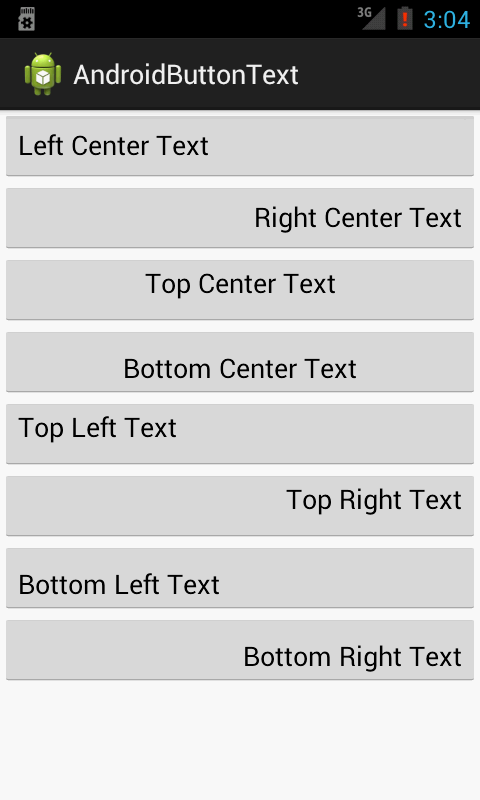
Here I attached below code to Align Button Text in Different ways.
Android Provide one Good Attribute i.e android:gravity in Button.
Simply just copy the below code in your layout xml
<LinearLayout xmlns:android="http://schemas.android.com/apk/res/android"
xmlns:tools="http://schemas.android.com/tools"
android:layout_width="match_parent"
android:layout_height="match_parent"
android:orientation="vertical"
tools:context=".MainActivity"
tools:ignore="HardcodedText" >
<Button
android:id="@+id/left"
android:layout_width="fill_parent"
android:layout_height="wrap_content"
android:gravity="left|center_vertical"
android:text="Left Center Text" />
<Button
android:id="@+id/right"
android:layout_width="fill_parent"
android:layout_height="wrap_content"
android:gravity="right|center_vertical"
android:text="Right Center Text" />
<Button
android:id="@+id/top_center"
android:layout_width="fill_parent"
android:layout_height="wrap_content"
android:gravity="top|center"
android:text="Top Center Text" />
<Button
android:id="@+id/bottom_center"
android:layout_width="fill_parent"
android:layout_height="wrap_content"
android:gravity="bottom|center"
android:text="Bottom Center Text" />
<Button
android:id="@+id/top"
android:layout_width="fill_parent"
android:layout_height="wrap_content"
android:gravity="top|left"
android:text="Top Left Text" />
<Button
android:id="@+id/top_right"
android:layout_width="fill_parent"
android:layout_height="wrap_content"
android:gravity="top|right"
android:text="Top Right Text" />
<Button
android:id="@+id/bottom_left"
android:layout_width="fill_parent"
android:layout_height="wrap_content"
android:gravity="bottom|left"
android:text="Bottom Left Text" />
<Button
android:id="@+id/bottom_right"
android:layout_width="fill_parent"
android:layout_height="wrap_content"
android:gravity="bottom|right"
android:text="Bottom Right Text" />
</LinearLayout>
Screenshot


Android Provide one Good Attribute i.e android:gravity in Button.
Simply just copy the below code in your layout xml
<LinearLayout xmlns:android="http://schemas.android.com/apk/res/android"
xmlns:tools="http://schemas.android.com/tools"
android:layout_width="match_parent"
android:layout_height="match_parent"
android:orientation="vertical"
tools:context=".MainActivity"
tools:ignore="HardcodedText" >
<Button
android:id="@+id/left"
android:layout_width="fill_parent"
android:layout_height="wrap_content"
android:gravity="left|center_vertical"
android:text="Left Center Text" />
<Button
android:id="@+id/right"
android:layout_width="fill_parent"
android:layout_height="wrap_content"
android:gravity="right|center_vertical"
android:text="Right Center Text" />
<Button
android:id="@+id/top_center"
android:layout_width="fill_parent"
android:layout_height="wrap_content"
android:gravity="top|center"
android:text="Top Center Text" />
<Button
android:id="@+id/bottom_center"
android:layout_width="fill_parent"
android:layout_height="wrap_content"
android:gravity="bottom|center"
android:text="Bottom Center Text" />
<Button
android:id="@+id/top"
android:layout_width="fill_parent"
android:layout_height="wrap_content"
android:gravity="top|left"
android:text="Top Left Text" />
<Button
android:id="@+id/top_right"
android:layout_width="fill_parent"
android:layout_height="wrap_content"
android:gravity="top|right"
android:text="Top Right Text" />
<Button
android:id="@+id/bottom_left"
android:layout_width="fill_parent"
android:layout_height="wrap_content"
android:gravity="bottom|left"
android:text="Bottom Left Text" />
<Button
android:id="@+id/bottom_right"
android:layout_width="fill_parent"
android:layout_height="wrap_content"
android:gravity="bottom|right"
android:text="Bottom Right Text" />
</LinearLayout>
Screenshot